

Introduction: Navigating the Project Management Tools Buying Process
The market for project management tools is vast and overwhelming, with dozens of platforms promising to organize your team and streamline your work. Choosing the wrong tool can lead to wasted budget, painful migrations, frustrated teams, and abandoned processes. The consequence isn’t just a lost subscription fee; it’s lost productivity and momentum. This comprehensive buyer’s guide cuts through the noise, providing a structured, decision-making framework to help you select the perfect software that fits your team’s size, methodology, and budget in 2026.
We’ll move beyond feature lists to focus on real-world utility, team adoption, and value for money. By the end, you’ll have a clear shortlist and the confidence to make a purchase that will genuinely enhance your team’s collaboration and project success.
Table of Contents
Pre-Purchase Assessment: Do You Actually Need This?
Before comparing tools, assess if you need a new system or if your current process can be optimized.
Signs You Need a New Project Management Tool
- Communication Chaos: Critical project details are buried in endless email threads, chat messages, or disparate documents.
- Unclear Accountability: No one knows who is doing what, by when, or what the current status is.
- Missed Deadlines: Tasks are frequently late because they fall through the cracks or dependencies aren’t visible.
- Manual Reporting: You spend hours each week manually compiling status updates from various sources.
- Team Growth: Your current tool (or spreadsheet) worked for 5 people but is crumbling under a team of 15.
Alternatives to Buying New
- Optimize Existing Tools: Could a better template in your current spreadsheet or a more disciplined use of shared drives solve the problem?
- Leverage Bundled Software: Your organization may already pay for Microsoft 365 (with Planner/Project) or Google Workspace. Maximize these before buying new.
- Process First, Tool Second: Sometimes the issue is the process, not the tool. Map your workflow on a whiteboard before digitizing it.
Right-Sizing Your Purchase (Avoiding Over/Under Buying)
- Over-Buying: A 5-person marketing team does not need an enterprise-grade tool like Jira with its complex setup. It leads to low adoption and wasted features.
- Under-Buying: A 50-person software engineering team using Trello will hit limits on structure, reporting, and integrations quickly, forcing another switch.
Key Decision Factors and Prioritization Matrix
Evaluate these four core factors to guide your choice.
Factor 1: Budget Analysis and Price Tiers
- Free Tier ($0): For small teams or simple projects. Offers core task lists, basic boards, and limited members (e.g., Asana, Trello, ClickUp). Ideal for testing.
- Mid-Tier ($8 – $15/user/month): The sweet spot for growing teams. Unlocks timelines (Gantt charts), advanced automations, integrations, and better guest permissions (e.g., Monday.com, Smartsheet, Basecamp).
- High/Enterprise Tier ($20+/user/month): For large organizations. Includes portfolio management, advanced security/compliance, custom analytics, and dedicated support (e.g., Jira Premium, Wrike, Microsoft Project Online).
- Where to Allocate Budget: If your budget is tight, prioritize user seats and core workflow features over fancy reporting. The best tool is the one your whole team can use.
Factor 2: Size, Capacity, and Specifications
- How to Calculate Your Exact Needs:
- User Count: Include all core team members and key stakeholders who need viewing/editing access.
- Project Volume & Complexity: How many concurrent projects? Do they have complex dependencies and multi-phase timelines?
- Storage & Uploads: Do you need to store and collaborate on large files (designs, videos) within the tool?
- Common Sizing Mistakes: Not accounting for future growth (pick a tool that scales), forgetting about guest/client users (they often count toward limits), and underestimating the need for admin time to manage the tool.
Factor 3: Essential vs. Nice-to-Have Features
- Must-Have Features for Functionality:
- Task Management: Create, assign, and track tasks with due dates.
- Multiple Views: Board (Kanban), List, Calendar, and Timeline (Gantt) views to suit different work styles.
- File Sharing & Comments: Centralize discussions and assets per task.
- Basic Integrations: Connect to core apps like Google Drive, Slack, and email.
- Luxury Features That May Not Be Worth It (Initially):
- Built-in Time Tracking: Often clunky; a dedicated tool (like Harvest) with an integration may be better.
- Native Chat/Messaging: If your team lives on Slack/MS Teams, an extra chat inside the PM tool becomes noise.
- Complex Resource Management: Only necessary for large teams with shared resources across many projects.
Factor 4: Brand Reputation and Support
- Top Brand Analysis & Reputation:
- Asana/Monday.com: Known for user-friendly interfaces and excellent team collaboration. Strong for general business teams.
- Jira (Atlassian): The industry standard for software development teams using Agile/Scrum. Powerful but complex.
- Smartsheet: The “spreadsheet on steroids,” beloved by those who think in grids and formulas. Excellent for reporting.
- ClickUp: The “all-in-one” ambitious contender, packing a massive feature set at a competitive price.
- Warranty and Customer Service Comparison: Enterprise tiers offer SLAs and dedicated support. For smaller teams, assess support channels (chat, email, knowledge base) and community forums. Read recent reviews about update frequency and bug resolution.
Feature Breakdown Dictionary
Technical Terms Explained Simply
- Kanban Board: A visual workflow with columns (e.g., To Do, Doing, Done) and cards representing tasks.
- Gantt Chart/Timeline View: A horizontal bar chart showing tasks against a timeline, illustrating dependencies and duration.
- Automation/Rules: “If this, then that” logic to automate repetitive actions (e.g., “When status changes to Done, notify the project lead”).
- API/Integration: A way for the PM tool to connect and share data with other software you use.
Marketing Hype vs. Real-World Utility
- Hype: “AI-Powered Insights!” Reality: Often basic analytics or automated tagging. Useful but not a decision driver.
- Hype: “Unlimited Everything!” Reality: Check the fine print. “Unlimited projects” may come with limited storage or features.
- Hype: “Fully Customizable!” Reality: High customization requires admin effort and can make the tool confusing for new users.
Compatibility and Integration Considerations
- Tech Stack: Does it integrate seamlessly with your current stack (e.g., Google Workspace, Microsoft 365, Salesforce, GitHub, Slack)?
- Methodology Fit: Is it built for your workflow? (e.g., Jira for Scrum/Kanban, Asana for general project tracking, Smartsheet for grid-based planning).
- Mobile App: Is a functional mobile app necessary for your team to update on the go?
Quality Assessment Guidelines
How to Assess Build Quality In-Person
Since software is digital, “build quality” refers to the user experience (UX).
- Take a Free Trial: The most critical step. Can you create a project and add tasks in under 5 minutes without reading a manual?
- Test on Mobile: Is the mobile app usable or a stripped-down afterthought?
- Check Speed: Does the interface feel snappy and responsive, or is it slow to load boards with many items?
Materials and Construction Standards
For software, this translates to architecture and reliability.
- Uptime History: Check status pages for historical downtime.
- Security Certifications: Look for SOC 2, ISO 27001 if handling sensitive data.
- Update Cadence: A tool with regular, meaningful updates is actively maintained.
Red Flags in Product Specifications
- Vagueness: “Enterprise-grade security” without specifics.
- Hidden Limits: “Unlimited tasks” but a limit of 100MB file uploads.
- Poor Reviews on Recent Updates: Indicates the vendor may be making unpopular changes or introducing bugs.
Where and When to Buy
Retailer Comparison (Online vs. Local)
You always purchase directly from the software provider’s website. There is no “local” retailer for cloud software. Beware of unauthorized resellers.
Seasonal Buying Patterns and Best Times
- Best Times: End of quarters and Black Friday/Cyber Monday often see discounts (e.g., 20-30% off annual plans). Many tools offer discounts for non-profits and startups.
- Worst Times: Avoid signing a long contract right before a price increase announcement (check the vendor’s blog/news).
New vs. Refurbished vs. Used Analysis
- New (Subscription): The standard. You get the latest features, support, and security updates.
- Refurbished/Used: Does not apply to SaaS (Software-as-a-Service). Avoid anyone selling “shared” or “resold” accounts, as they violate terms of service and are insecure.
How to Negotiate or Find Hidden Deals
- Annual Billing: Paying annually typically saves 10-20% over monthly.
- User Seat Count: Ask for a discount if you are purchasing a large number of seats (e.g., 50+).
- Non-Profit/Education Discounts: Always ask if available.
- Pilot Program: Propose a pilot with a small team before a full rollout to secure a limited-time discount.
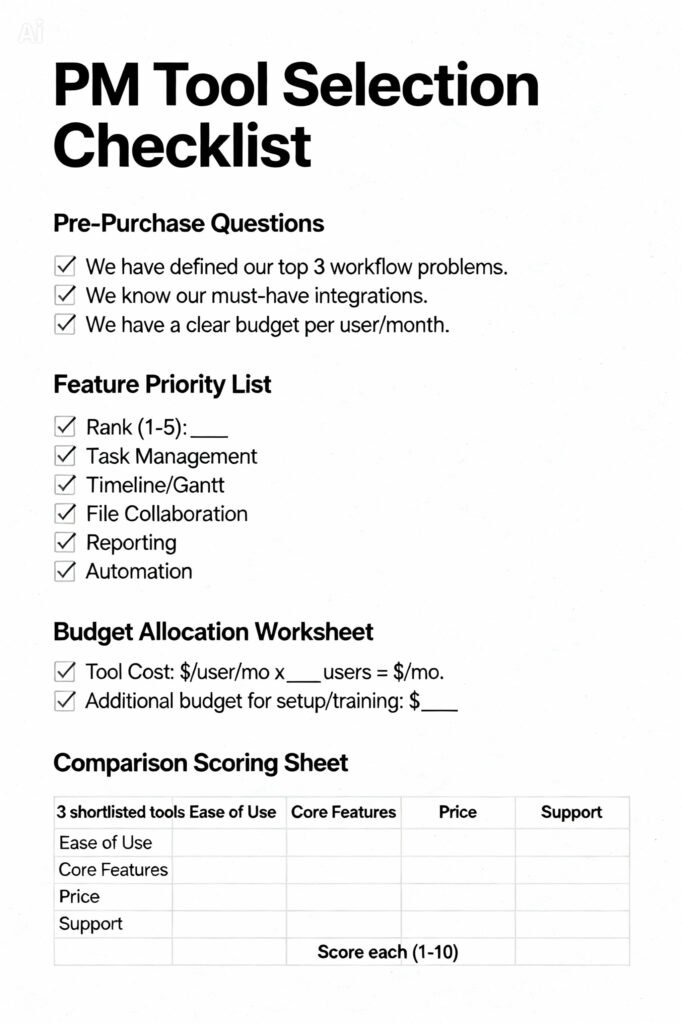
Interactive Buying Checklist
Recommended Products by Category
Best Overall in Each Price Tier
- Best Free Tool: Asana (Free Plan) or ClickUp (Free Forever). Both offer robust free tiers for small teams to manage tasks and projects.
- Best Mid-Tier Value: Monday.com or ClickUp (Unlimited Plan). Excellent balance of power, usability, and price for growing teams.
- Best Enterprise Power: Jira (Premium/Enterprise) for software teams, Smartsheet Enterprise for grid-centric business teams, or Wrike for marketing and professional services.
Best for Specific Use Cases
- For Software Development (Agile/Scrum): Jira Software is the undisputed leader, built for sprint planning, bug tracking, and code integration.
- For Marketing & Creative Teams: Monday.com or Asana excel with visual boards, content calendars, and client-friendly interfaces.
- For Spreadsheet Lovers & Heavy Reporting: Smartsheet feels familiar but adds powerful automation, forms, and dashboards.
- For Client-Facing Agencies: Basecamp offers a famously simple, client-friendly interface that reduces “where is that?” emails.
Best for Beginners vs. Experts
- Best for Beginners: Trello (for ultimate simplicity) or Asana (for a gentle learning curve with room to grow).
- Best for Experts/Power Users: ClickUp (to customize everything) or Jira (to configure complex software development workflows).
Post-Purchase Considerations
Setup and Installation Best Practices
- Start Small: Begin with one pilot project or team to build success stories.
- Appoint Champions: Identify tech-savvy team members to learn the tool deeply and help others.
- Customize Gradually: Don’t try to build the perfect system on day one. Use default views first, then adapt based on real use.
- Integrate Key Apps: Connect your email, drive, and chat tools immediately to create a central hub.
Maintenance Schedule and Requirements
- Weekly: Encourage team leads to review board statuses.
- Monthly: Clean up completed projects, archive old tasks, and review automation rules.
- Quarterly: Re-evaluate your workflow and tool configuration. Are there new features you should adopt? Is the tool still meeting needs?
When and How to Upgrade in the Future
- When: You consistently hit user limits, need a premium feature (like time tracking or advanced reporting), or your team’s workflow has fundamentally changed.
- How: Contact sales to discuss upgrade options. Often, you can upgrade your plan instantly. For a major switch (e.g., Asana to Jira), plan a careful data migration and team retraining project.
Frequently Asked Questions
Q1: What is the best free project management tool?
A: For most teams, Asana’s free plan or ClickUp’s Free Forever plan offer the best balance of features and user-friendliness for up to 15 users. Trello is excellent for very simple, Kanban-based task management.
Q2: Is Monday.com better than Asana?
A: It depends. Monday.com is highly visual and customizable, great for teams that want to build custom workflows. Asana has a smoother, more opinionated user experience that many find more intuitive out-of-the-box. Trial both.
Q3: What tool do software developers use?
A: Jira Software from Atlassian is the industry standard for Agile software teams due to its deep integration with development tools (GitHub, Bitbucket), sprint planning, and bug/issue tracking.
Q4: Can I use project management tools for personal tasks?
A: Absolutely. Tools like Trello, Asana, or Todoist are excellent for personal productivity, goal tracking, and home project management.
Q5: How much do project management tools cost?
A: Prices range from free (for basic features) to $8-$15 per user per month for professional teams, and $20+ per user per month for enterprise plans with advanced features.
Q6: What is the easiest project management tool to learn?
A: Trello is arguably the simplest due to its Kanban board metaphor. Asana and Basecamp are also renowned for their clean, intuitive interfaces.
Q7: Do these tools work for remote teams?
A: Yes, they are essential for remote teams. They provide a central source of truth for tasks, documents, and communication, replacing the physical office whiteboard.
Q8: Can I switch tools later if I don’t like my choice?
A: Yes, but it can be disruptive. Most tools offer some export capability. The cost is in time, data migration effort, and retraining your team. This is why a thorough selection process and a pilot are crucial.
Q9: What is a Gantt chart and do I need one?
A: A Gantt chart is a bar chart that shows tasks on a timeline, illustrating their duration and dependencies. You need one if you manage complex projects with many interdependent tasks and fixed deadlines (e.g., construction, event planning).
Q10: Are there project management tools that work offline?
A: Most modern tools are cloud-based and require an internet connection. Some, like Microsoft Project, have desktop versions with offline capabilities, but collaboration features are limited when offline.
Q11: How do I get my team to actually use the new tool?
A: Lead by example, provide training, integrate it into daily stand-ups/meetings, and make it the single source of truth for project information. Resistance fades when the tool reduces their pain.
Q12: What’s the difference between Jira and Trello?
A: Both are from Atlassian. Trello is a simple, flexible Kanban board for any kind of task tracking. Jira is a powerful, customizable platform built for software development, with issue tracking, scrum/kanban boards, and advanced reporting. Think of Trello as a bicycle and Jira as a semi-truck.
Q13: Is ClickUp really an “all-in-one” tool?
A: ClickUp aims to be, offering tasks, docs, goals, chat, and time tracking in one platform. It’s powerful and cost-effective, but its extensive feature set can make it feel complex compared to more streamlined tools.
Q14: Do I need a separate tool for time tracking?
A: Not necessarily. Many PM tools (like ClickUp, Monday.com) have built-in time tracking. However, if you need detailed client billing or sophisticated time analytics, a dedicated tool like Harvest or Toggl that integrates with your PM software may be better.
Q15: What tool is best for managing multiple projects (portfolio management)?
A: Look for tools with “Portfolio” views or high-level dashboards. Monday.com, Smartsheet, Wrike, and Asana (Portfolio in Business plan) offer strong portfolio management features to track the health and progress of multiple projects at once.
Stop drowning in spreadsheets and missed deadlines. Find your perfect PM tool by taking our 2-minute quiz that matches your team’s size, workflow, and budget with the top 3 recommended options.
4. External Resources:
- G2 Crowd or Capterra Project Management Software Grid: Authoritative, user-review-based rankings and comparisons of all major PM tools. (Link to relevant category)
- Software Advice (by Gartner): Provides detailed feature comparisons and tailored recommendations. (Link to relevant category)
- Atlassian University (for Jira): Official training and certification for getting the most out of Jira and Confluence. (https://university.atlassian.com/)